
Call Stack Visualizer
The Call Stack Visualizer is an animated recursion tracing tool that shows exactly how the stack grows and unwinds. This recursion visualizer helps CS students understand memory stack visualization in real-time.
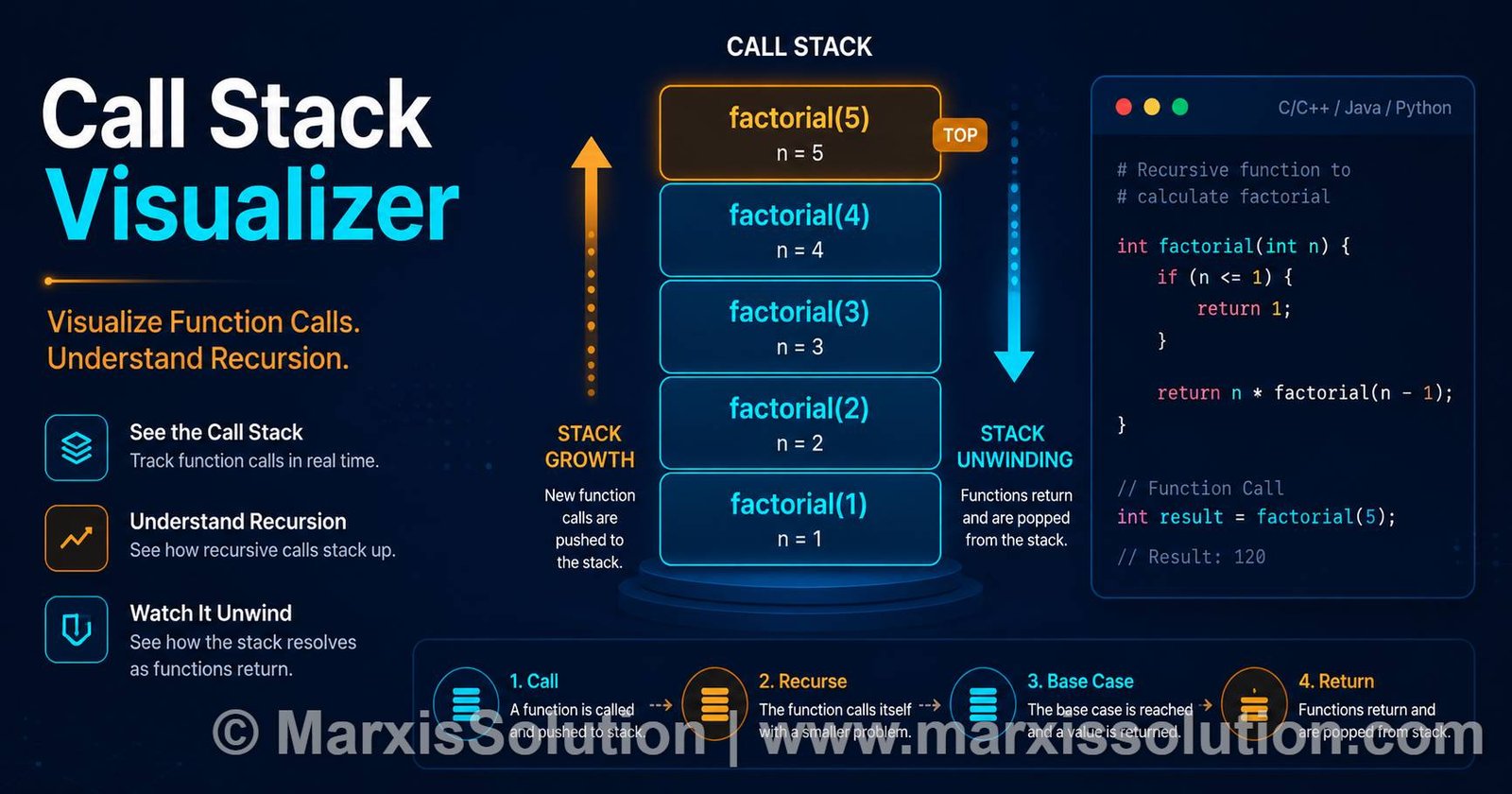
Watch recursive calls grow and unwind in real-time. Perfect for CS students learning recursion and stack memory.
The call stack is a fundamental concept in programming. Every time a function is called, a new stack frame is created. This Call Stack Visualizer is a simple stack visualization tool that shows you exactly how recursion works — watch the stack grow with each call and unwind as each function returns. This memory stack visualization tool is perfect for CS students learning recursion.
From Student to Founder
Master recursion now. When you’re ready to start your own IT business, we provide the infrastructure — no loans, no debt, no equity loss.
Learn How We Help Founders →Time
O(n)
Space
O(n)
Max Depth
0
Function: –
Input (n): –
Depth: 0
How the Call Stack Works — A Stack Visualizer Guide
Understanding the call stack is key to mastering recursion. Our Call Stack Visualizer provides a memory stack visualization to make this concept clear.
Stack Frame
Every time a function is called, a new stack frame is created containing the function’s arguments, local variables, and return address.
Stack Unwinding
When a function returns, its frame is popped off the stack. The return value is passed back to the calling function.
Recursion Depth
Each recursive call increases the stack depth. The maximum depth is limited by available memory — our visualizer shows you exactly how deep recursion goes.
Benefits of Using This Call Stack Visualizer
Here’s why this stack visualizer is the best tool for learning recursion.
Visual Learning
See recursion in action with real-time stack visualization. Watch frames appear and disappear as the function executes.
Step-by-Step
Control the speed and watch each step carefully. Perfect for understanding exactly how recursive calls are made and returned.
Multiple Algorithms
Visualize factorial, Fibonacci, and power functions. See how different recursive patterns affect the call stack.
Educational Focus
Designed specifically for CS students learning recursion. Includes cheat sheet, FAQ, and examples to support your learning.
Types of Recursion Visualized with Our Stack Visualizer
Different recursive patterns create different stack behaviors. The Call Stack Visualizer shows exactly how each pattern affects the stack.
Linear Recursion
Each function call makes at most one recursive call. Factorial is a classic example.
factorial(5) → factorial(4)
→ factorial(3) → factorial(2)
→ factorial(1)
Tree Recursion
Each function call makes multiple recursive calls. Fibonacci is the classic example.
fib(5) → fib(4) + fib(3)
→ fib(3) + fib(2) + fib(2)
+ fib(1)
Tail Recursion
The recursive call is the last operation. Some languages optimize this to avoid stack growth.
function tailFact(n, acc=1) {
  if (n <= 1) return acc;
  return tailFact(n-1, n*acc);
}
Common Recursion Mistakes to Avoid
Even experienced programmers make these errors. Learn to spot them early.
No Base Case
Forgetting to define a base case is the most common recursion mistake. Without a base case, your function will call itself infinitely, eventually causing a stack overflow error. Always start by defining when the recursion should stop.
Wrong Base Case
Having a base case that's never reached is just as bad as having no base case. For example, if your base case checks for n == 0 but you always call the function with positive numbers, the base case will never trigger. Test your base case with the smallest possible input.
Not Making Progress
Each recursive call should move closer to the base case. If your recursive call doesn't reduce the problem size, you'll never reach the base case. Always ensure that your input changes in a way that approaches the base condition.
💡 The Call Stack Visualizer helps you catch these mistakes by showing exactly how your recursion executes. Watch the stack grow and see if it ever stops!
Real-World Applications of Recursion
Recursion isn't just for exams — it's used everywhere in software development.
File System Navigation
Operating systems use recursion to traverse directories and find files. Every time you search for a file, recursion is likely involved.
Pathfinding Algorithms
GPS navigation uses recursive algorithms like Depth-First Search and Dijkstra's algorithm to find the shortest path between locations.
Fractal Generation
Fractals like the Mandelbrot set are generated using recursive formulas. The self-similar nature of recursion makes it perfect for creating complex patterns.
Document Parsing
JSON, XML, and HTML are parsed using recursive descent parsers. The nested structure of these formats makes recursion the natural choice.
💡 Understanding recursion with a Call Stack Visualizer prepares you for these real-world applications. The same concepts apply whether you're navigating a file system or generating a fractal.
Recursion Cheat Sheet — Stack Visualizer Reference
Key concepts to remember about the call stack when using a recursion visualizer or stack visualizer tool.
📥 Push
Adding a frame to the stack
📤 Pop
Removing a frame from the stack
🔝 Stack Top
The currently executing function
📏 Stack Depth
Number of frames on the stack
🏁 Base Case
The condition that stops recursion
🔄 Recursive Case
The function calling itself
No email required. Instant download. Perfect for students using the Call Stack Visualizer or any recursion visualizer tool.
Why CS Students Use This Tool
Thousands of computer science students have used this stack visualizer to master recursion.
Visual Learning Makes It Click
Recursion can be abstract and difficult to understand from textbooks alone. The Call Stack Visualizer shows you exactly what's happening in memory, making the concept concrete and easier to grasp.
Step-by-Step Understanding
With adjustable speed controls, you can watch recursive calls at your own pace. See exactly when each frame is pushed and popped, helping you understand the flow of execution.
Perfect for Exam Prep
Whether you're studying for a Theory of Computation exam or preparing for a coding interview, understanding recursion is essential. This tool helps you visualize and internalize the concepts.
⭐ Join thousands of students who have improved their understanding of recursion with the Call Stack Visualizer.
📖 Frequently Asked Questions
📌 What is a stack frame? ▼
A stack frame is a block of memory that stores information about a function call. It contains the function's arguments, local variables, and the return address. The Call Stack Visualizer shows each stack frame as a separate block.
📌 Why does recursion use so much memory? ▼
Each recursive call adds a new frame to the stack. If your recursion goes 1000 levels deep, you have 1000 frames in memory. This can cause a stack overflow if the depth is too high.
📌 What's the difference between stack and heap? ▼
The stack is used for function calls and local variables (LIFO structure). The heap is used for dynamically allocated memory (objects, arrays). Stack memory is automatically managed, while heap memory requires manual management in languages like C++.
📌 How can I avoid stack overflow in recursion? ▼
Use tail recursion (where possible), ensure your base case is reached, or convert to an iterative solution. Some languages like Scheme optimize tail recursion to prevent stack growth.
Additional Resources
Explore more tools and resources for computer science students.
Still Stuck? We're Here to Help
Can't figure out a recursive function? Submit your code and we'll help you trace the call stack.
Submit Your Question — Get a Step-by-Step Solution
One of our CS experts will review your code and send you a detailed trace of the call stack within 24-48 hours. Free. No strings attached.
📋 Before you submit:
- Share the recursive function you're trying to understand
- Include the input value you're testing
- Tell us where you're getting confused
Fill out the form below
🔒 Your email is safe with us. We'll never share your information.
⚠️ Important Disclaimer
We aim to respond within 24-48 hours, but response times may vary. Our guidance is meant to help you learn — not to replace your own work or your professor's instruction.
Get More CS Resources
Subscribe to get new recursion examples, practice problems, and CS study guides delivered to your inbox.
No spam. Unsubscribe anytime.
© 2025 MarxisSolution | The Framework | The Solution | Student Hub | Contact
Free animated call stack visualizer for tracing recursion — built for computer science students.